Understand Openclaw by Building One - Part 1
Understand Openclaw by Building One - Part 1
A comprehensive guide to building an AI agent with tools, skills, and memory - everything you need before going to production
Created on Mar 16, 2026, Last Updated on May 11, 2026, By a Developer
All code snippets and working code bases are available at this repo.
Every Agent Starts as a Loop
Strip away the buzzwords, and an agent is just a chat loop that sometimes executes code. The core is maybe 20 lines:
while True:
    user_input = await get_user_input()
    response = await session.chat(user_input)
    display(response)
That’s it. No magic. The session.chat() method sends messages to the LLM and returns the response. You already know this pattern.
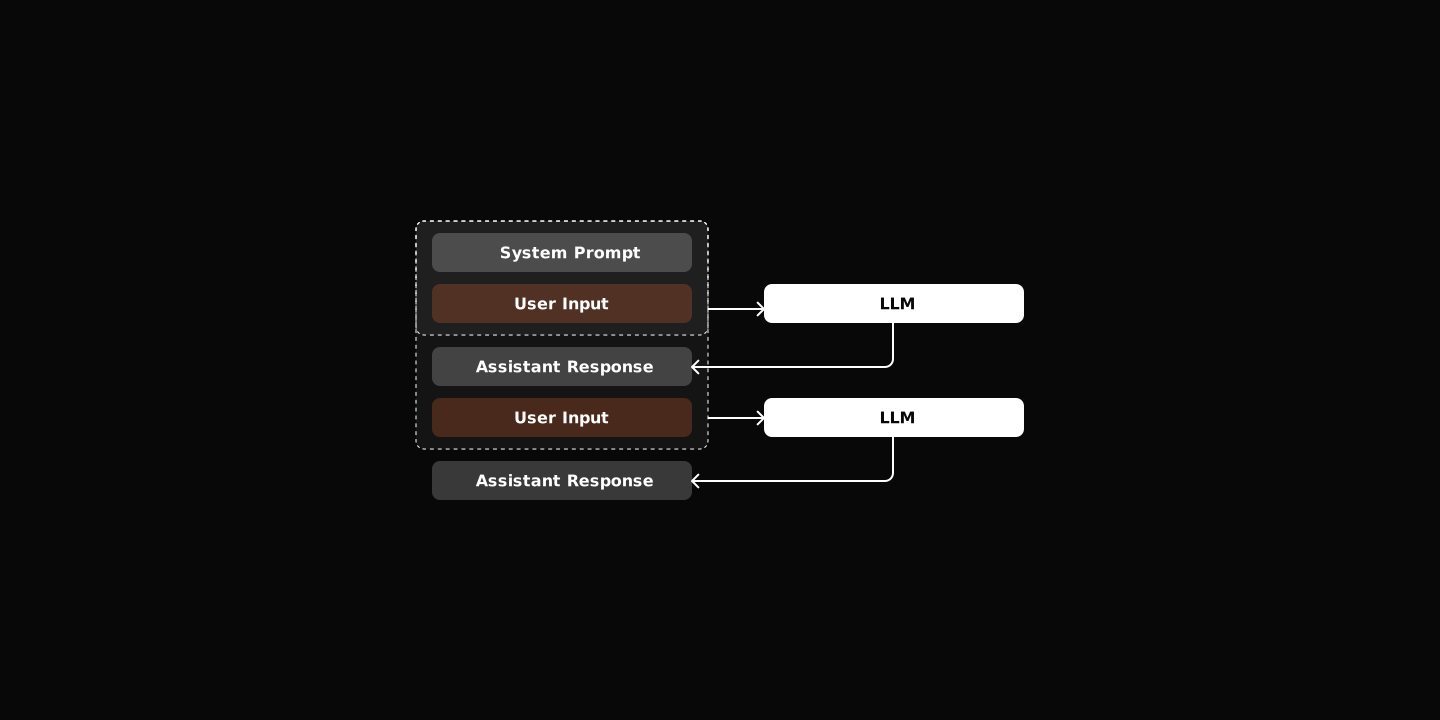
But a chatbot isn’t an agent. What makes the difference?
Tools Transform Talk into Action
The LLM decides when to use them. Your job is to define what tools exist and how to run them.
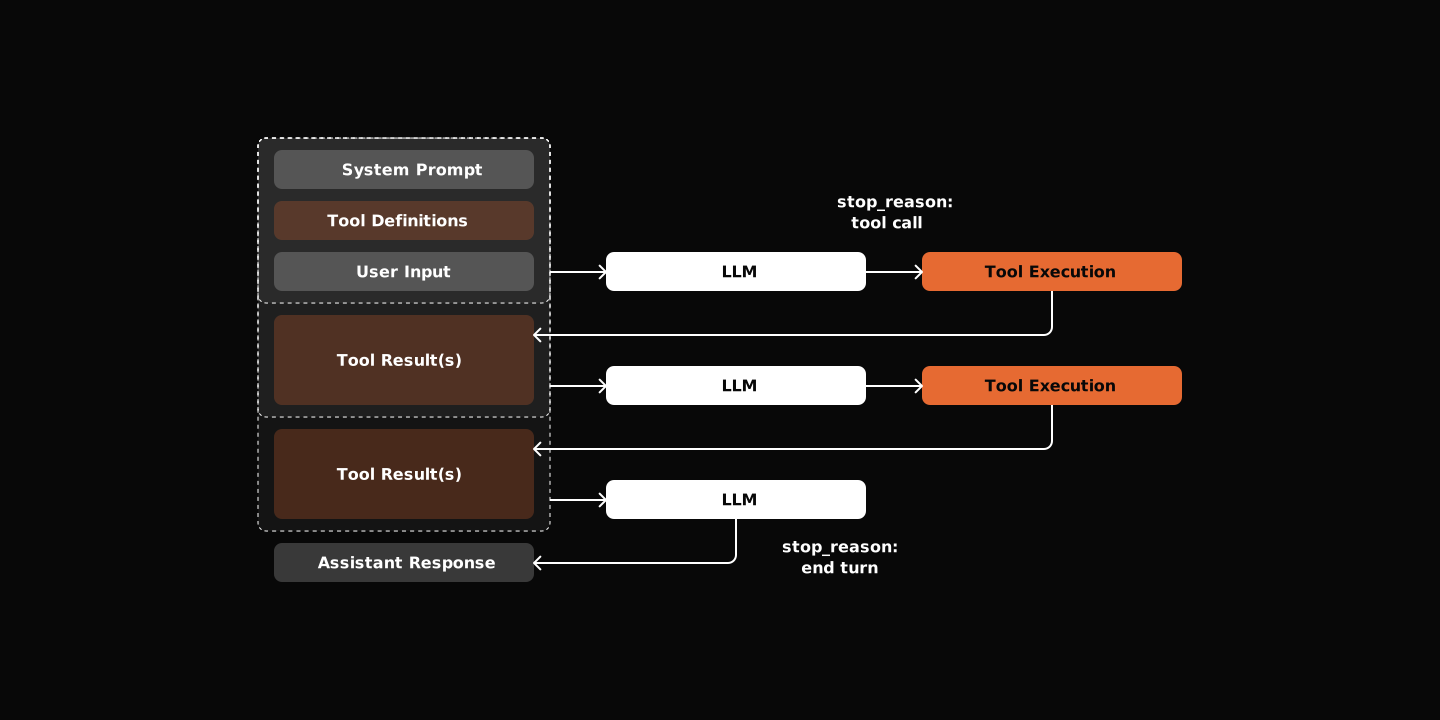
The pattern is simple: define a tool schema, let the LLM decide when to call it, execute it, feed the result back.
class BaseTool(ABC):
    name: str
    description: str
    parameters: dict[str, Any]

    @abstractmethod
    async def execute(self, session, **kwargs) -> str:
passdescriptiontells the LLM what the tool doesparametersschema tells the what arguments to provideexecutemethod is your implementation
The Tool Calling Loop
When the LLM wants to use a tool, it returns a tool_calls list instead of text and emits stop_reason as tool_use. Your agent executes each tool, adds the results to the message history, and calls the LLM again. This continues until the LLM responds with text.
while True:
    messages = self.state.build_messages()
    content, tool_calls = await self.llm.chat(messages, tool_schemas)
    if not tool_calls:
        break

    await self._handle_tool_calls(tool_calls)
Start Minimal
You don’t need dozens of tools. Read, Write, and Bash are enough to start. These give your agent the ability to write and execute code—everything else builds on this foundation.
Beyond Tools: Dynamic Capabilities
Tools are part of agents’ code assets. But every time you want it to do something new, you have to write code, restart the server, and redeploy.
How do you extend its capability and knowledge base without changing its code?
Skills - Dynamic Capabilities Loading
Skills are lazy-loaded capabilities at runtime. It isn’t something OpenClaw invented, but an open standard. Reference the official document for more info.
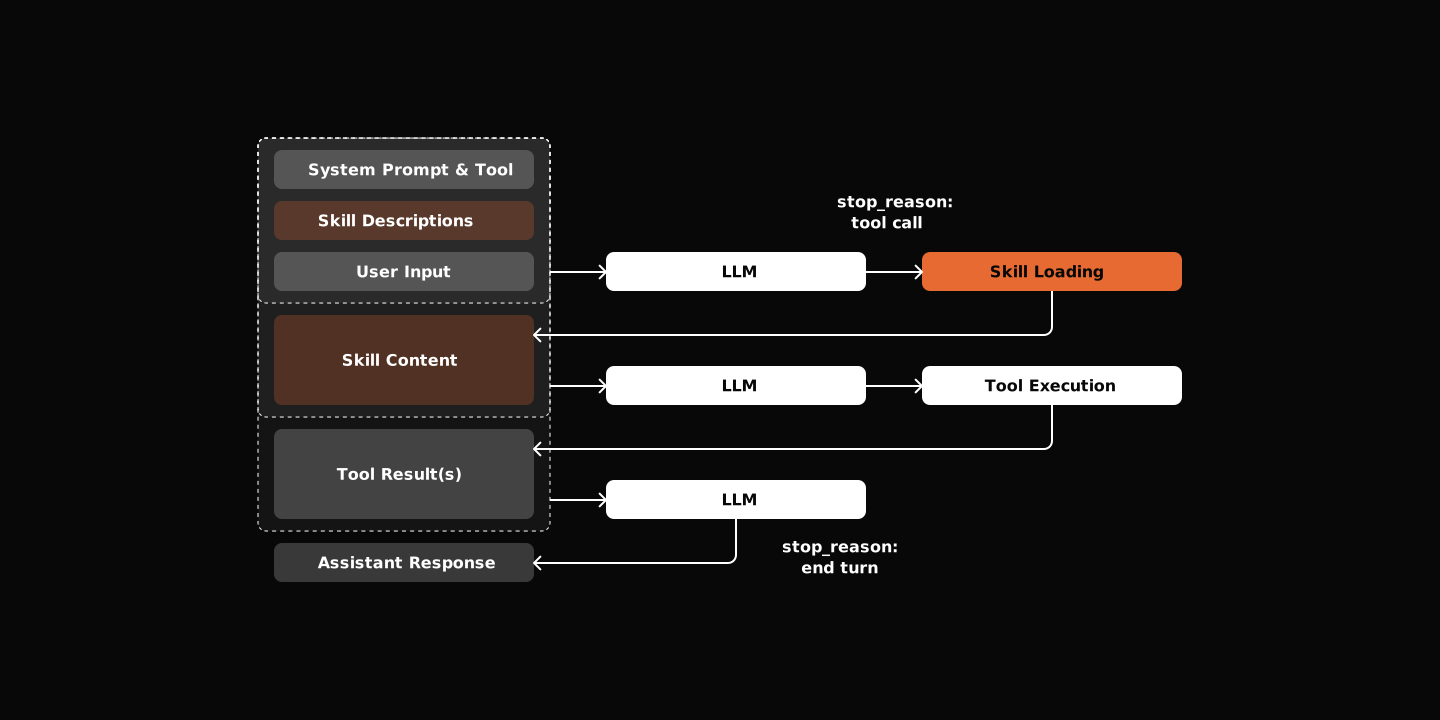
The pattern is simple: a SKILL.md file with YAML frontmatter for metadata loaded up front and markdown for instructions loaded when needed.
def create_skill_tool(skill_loader):
    # Discover skills and get metadata
    skill_metadata = skill_loader.discover_skills()

    # Build XML description of available skills
    skills_xml = "<skills>\n"
    for meta in skill_metadata:
        skills_xml += f'  <skill name="{meta.name}">{meta.description}</skill>\n'
    skills_xml += "</skills>"

    # Tool loads full content only when called
    @tool(name="skill", description=f"Load skill. {skills_xml}", ...)
    async def skill_tool(skill_name: str, session) -> str:
        return skill_loader.load_skill(skill_name).content
Two Approaches to Skills
OpenClaw doesn’t implement skills with a separate tool. Instead, it uses system prompt injection with file reading:
- Tool Approach: Dedicated
skilltool lists available skills and loads content. The tool schema includes skill metadata in its description. Self-contained skill discovery and loading. - System Prompt Approach: Skill metadata (id, name, description) injected into system prompt. Agent uses standard
readtool to read SKILL.md. No specialized skill tool needed, simpler tool registry.
Slash Commands: User Control
Sometimes you want direct control, not a conversation. Slash commands let you manage the session itself: list skills, show session info, clear history. The implementation is straightforward.
class Command(ABC):
    name: str
    aliases: list[str] = []

    @abstractmethod
    async def execute(self, args: str, session) -> str:
        pass

class CommandRegistry:
    async def dispatch(self, input: str, session) -> str | None:
        """Parse and execute a slash command. Returns None if not a command."""
        if not input.startswith("/"):
            return None
        # Parse: /command args
        parts = input[1:].split(None, 1)
        cmd_name, args = parts[0], parts[1] if len(parts) > 1 else ""
        if cmd_name in self._commands:
            return await self._commands[cmd_name].execute(args, session)
        return None
Integration in the main loop—check commands before sending to LLM:
async def run(self) -> None:
    while True:
        user_input = await get_input()
        # Check for slash commands first
        cmd_response = await self.command_registry.dispatch(user_input, self.session)
        if cmd_response is not None:
            self.console.print(cmd_response)
            continue

        # Normal chat
        response = await self.session.chat(user_input)
        self.display_agent_response(response)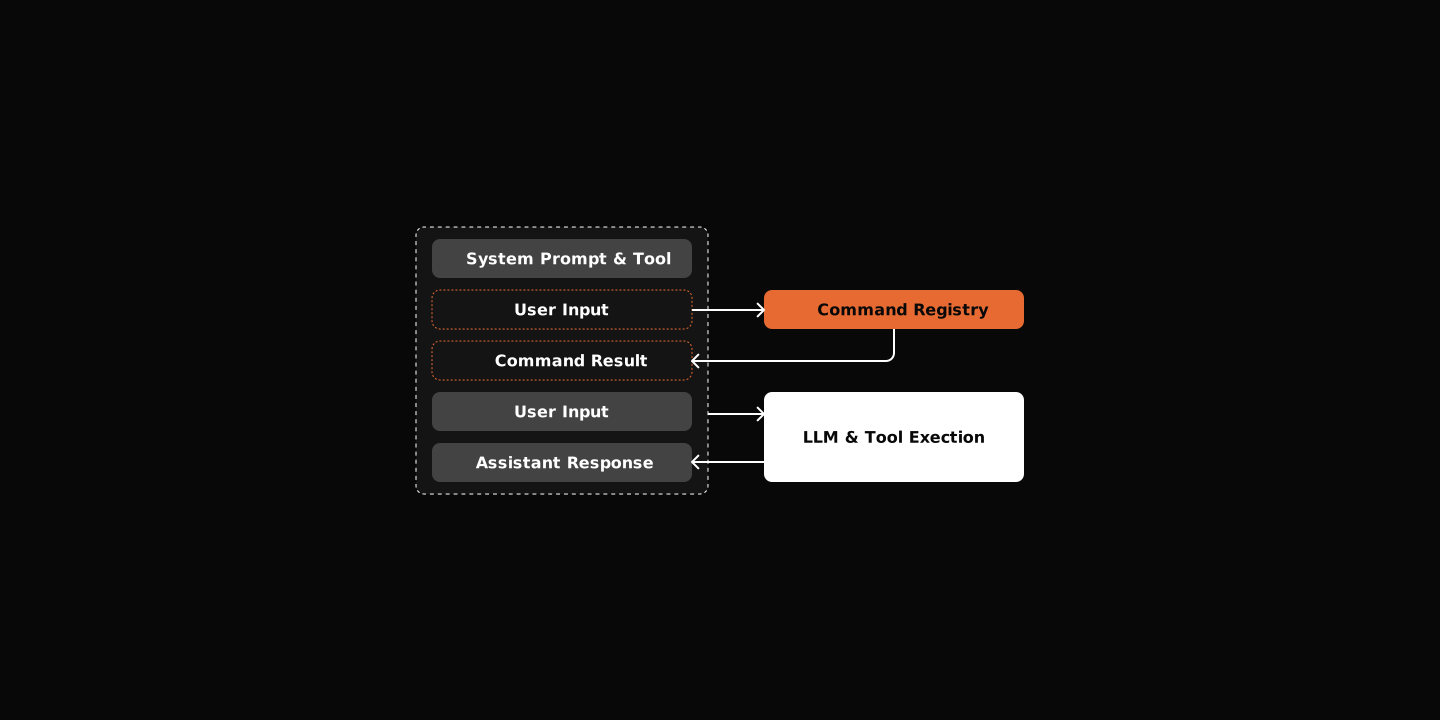
Slash commands may or may not be added to the session history (message log sent to the LLM). This is a design decision—commands are user controls, not conversation content. Either approach is valid depending on your use case.
Web Tools: Connect to the World
Your agent lives in a terminal. But the information it needs lives on the web.
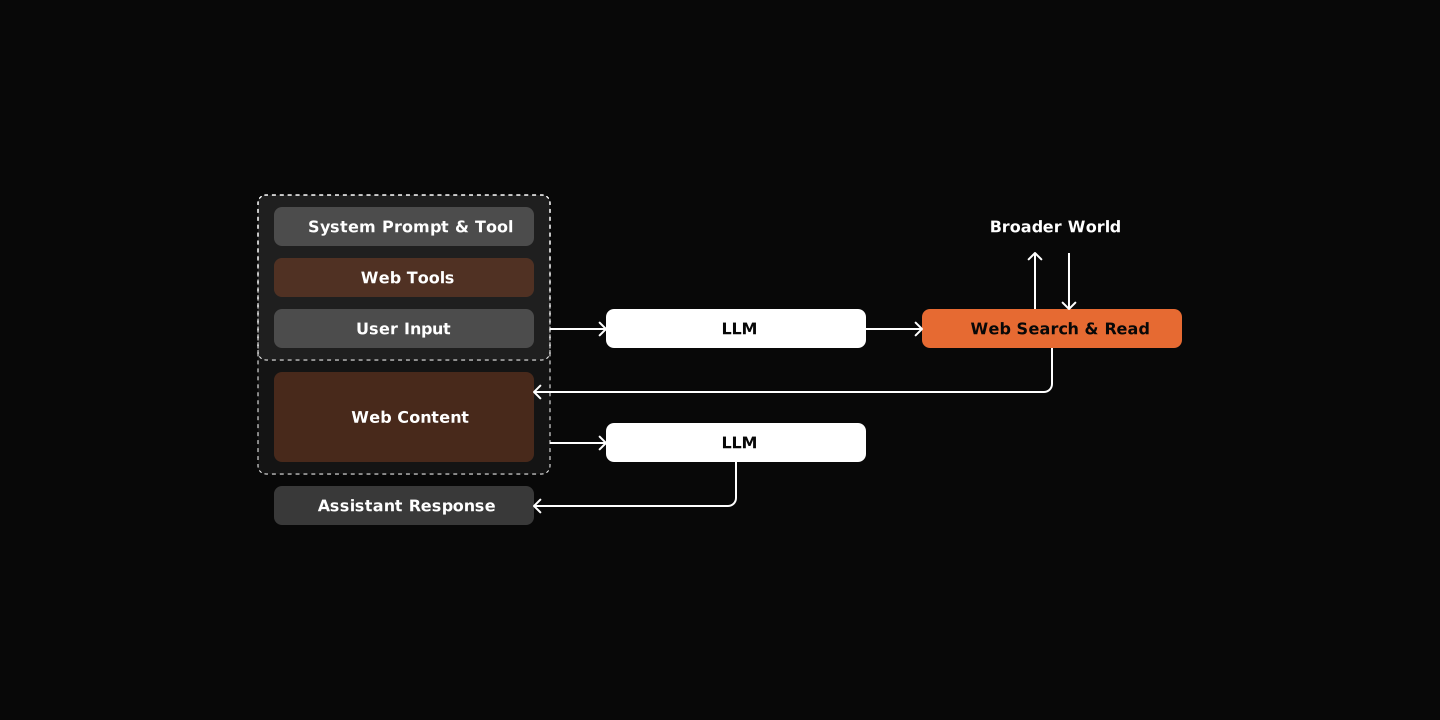
Two tools bridge this gap:
- websearch: Search the web and get structured results
- webread: Fetch and extract content from URLs
@tool(...)
async def websearch(query: str, session) -> str:
    results = await provider.search(query)
    output = []
    for i, r in enumerate(results, 1):
        output.append(f"{i}. **{r.title}**\n   {r.url}\n   {r.snippet}")
    return "\n\n".join(output)
Now your agent can research, fact-check, and pull in live data.
Save the Conversation
You and your agent had a great conversation. And you kill the shell. Too bad it doesn’t remember any of it.
The solution is simple: just save session metadata and messages to disk. It can end up something like this:
.history/
├── index.jsonl              # Session metadata
└── sessions/
    └── {session_id}.jsonl   # Messages (one file per session)
And corresponding methods to operate on it:
class HistoryStore:
    def create_session(self, agent_id: str, session_id: str) -> dict:
        """Create a new conversation session."""

    def save_message(self, session_id: str, message: HistoryMessage) -> None:
        """Save a message to history."""

    def get_messages(self, session_id: str) -> list[HistoryMessage]:
        """Get all messages for a session."""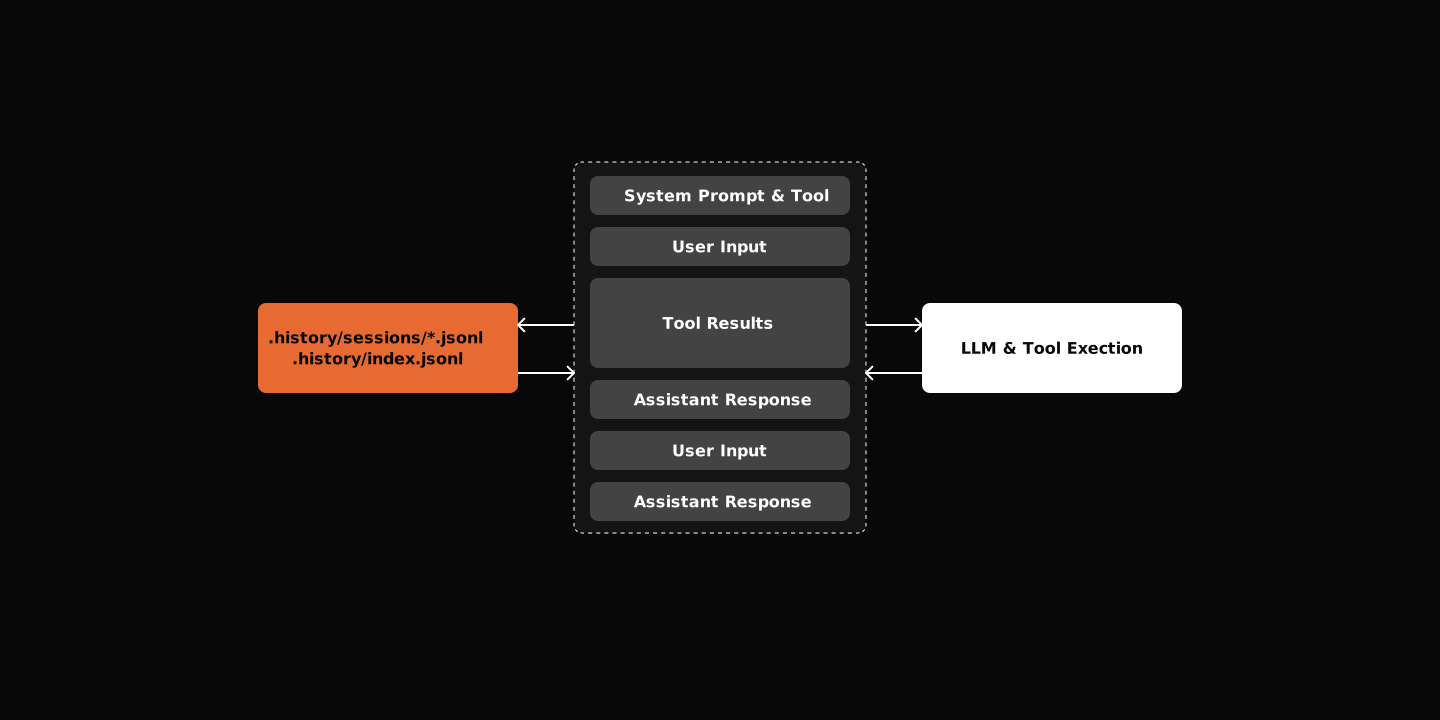
Context Windows: The Hidden Limit
LLMs have limits. Even with 200k (just became 1M at the moment I am writing this piece) token context windows, you’ll hit them. All conversation messages, tool call request response—they all add up. LLM will refuse to handle them eventually.
The solution is compaction: summarize old messages, keep the signal, drop the noise.
Compaction: Pack and Carry On
To be defensive, we apply two layers of protection:
- Summarize — Ask LLM to condense old messages into a summary (expensive, preserves gist).
- Truncate — Cut down oversized tool outputs first (cheap, no LLM call). This solves the edge case where the last tool call returns a huge result that bloats up the context directly, leaving the entire context in a dead state.
async def check_and_compact(self, state: SessionState) -> SessionState:
    if self.estimate_tokens(state) < self.token_threshold:
        return state

    # Stage 1: truncate large tool results
    state.messages = self._truncate_large_tool_results(state.messages)

    if self.estimate_tokens(state) < self.token_threshold:
        return state

    # Stage 2: summarize old messages
    return await self._compact_messages(state)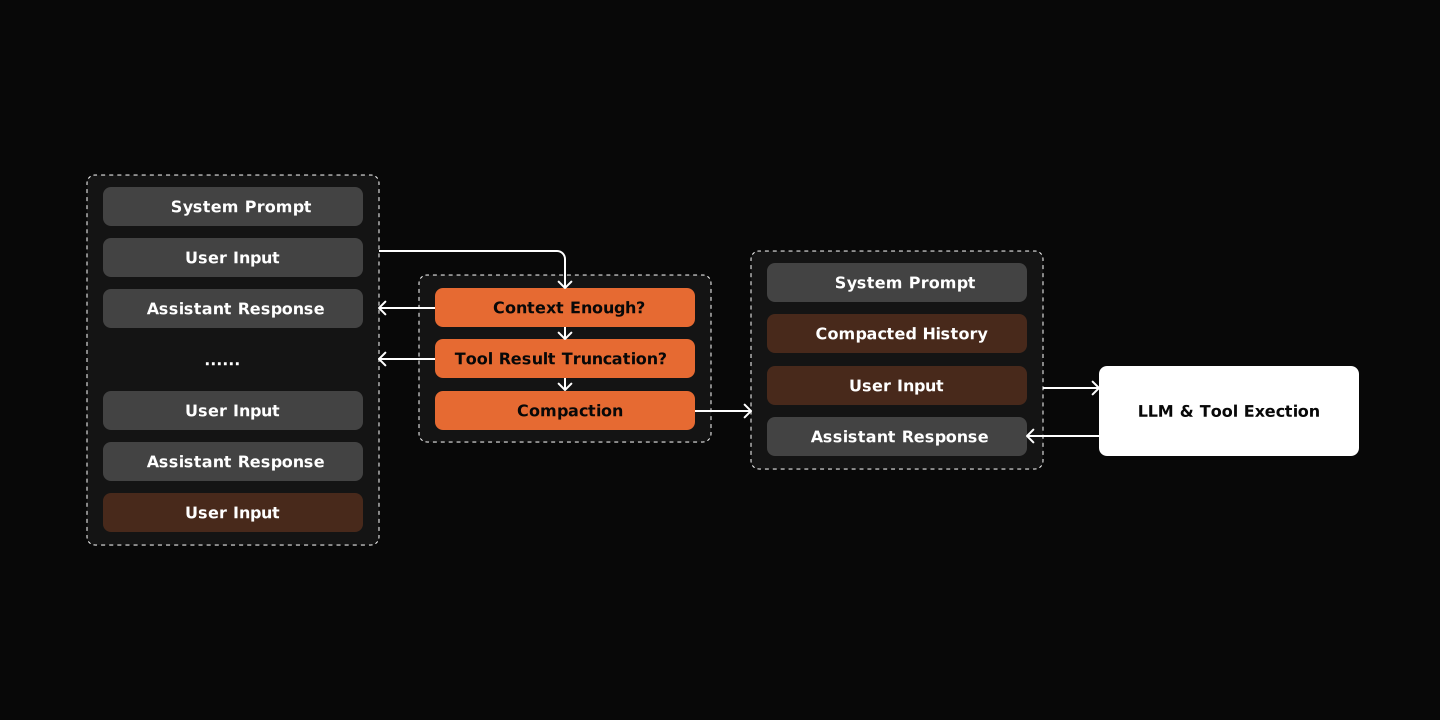
The Trade-off
Same as human beings can’t remember exactly what happened a year ago, the model loses nuance after compaction. You’re balancing memory against token cost.
The example repo implements /context to monitor usage and /compact to manually trigger when needed.
Context management is the difference between a demo and a product.
Agents That Grow
Skills solve the problem of extending agents’ capability. Web tools lift the restriction of agents’ limited knowledge base.
If you try this out, you will find the agent is already way more capable than your expectation.
But what happens when you want to talk to it from Telegram? Or your phone? Or another program? Or even run multiple agents at once?
Continue to Part 2: Scale Your Agent to learn how to build production-ready infrastructure.
⭐ Star the repo if you found this guide helpful!
On this page
Every Agent Starts as a Loop
Tools Transform Talk into Action
The Tool Calling Loop
Start Minimal
Beyond Tools: Dynamic Capabilities
Skills - Dynamic Capabilities Loading
Two Approaches to Skills
Slash Commands: User Control
Web Tools: Connect to the World
Save the Conversation
Context Windows: The Hidden Limit
Compaction: Pack and Carry On
The Trade-off
Agents That Grow
Related
How Hermes-Agent Evolves Over Time
by a Developer
May 2026
by a Developer
agent
ai
Hermes-Agent claims to be "the agent that grows with you". It's not marketing — it's three counters, a background fork, and a 100-line prompt.
Learn From Claude Code: Agent Spawning
by a Developer
Apr 2026
by a Developer
agent
ai
Learning Claude Code's agent spawning by inspecting its leaked source code.
Learn From Claude Code: App State Machine
by a Developer
Apr 2026
by a Developer
agent
ai
Learning Claude Code's App State by inspecting its leaked source code.
Learn From Claude Code: MCP Integration
by a Developer
Apr 2026
by a Developer
agent
ai
Anthropic invented MCP a year ago. Now they're experimenting with skill-ifying it. Here's what the leaked source reveals about the pivot.