Understand Openclaw by Building One - Part 2
Understand Openclaw by Building One - Part 2
Event-driven architecture, multi-agent orchestration, scheduling, and memory systems - everything you need to run agents at scale.
Created on Mar 16, 2026, Last Updated on May 11, 2026, By a Developer
This is Part 2 of the guide. Start with Part 1: Build a Capable AI Agent if you haven’t built your agent yet.
All code snippets, more detailed step by step guide are available at this repo.
Beyond the CLI
Your agent works great in the terminal. But what if you want to talk to it from Telegram? Or your phone? Or another program? Or even multiple of them?
Event-Driven Architecture
To make the agent more scalable, we introduce event-driven architecture before adding more features.
The pattern is pub/sub, and you already know it. An event bus sits at the center. Messages come in as events, workers process them, responses go out as events.
@dataclass
class InboundEvent:
    session_id: str
    content: str
    source: EventSource

@dataclass
class OutboundEvent:
    session_id: str
    content: str
    error: str | None = None

class EventBus(Worker):
    def subscribe(self, event_class, handler):
        """Subscribe a handler to an event class."""

    async def publish(self, event: Event) -> None:
        """Publish an event to the internal queue."""
        await self._queue.put(event)

    async def run(self) -> None:
        while True:
            event = await self._queue.get()
            await self._dispatch(event)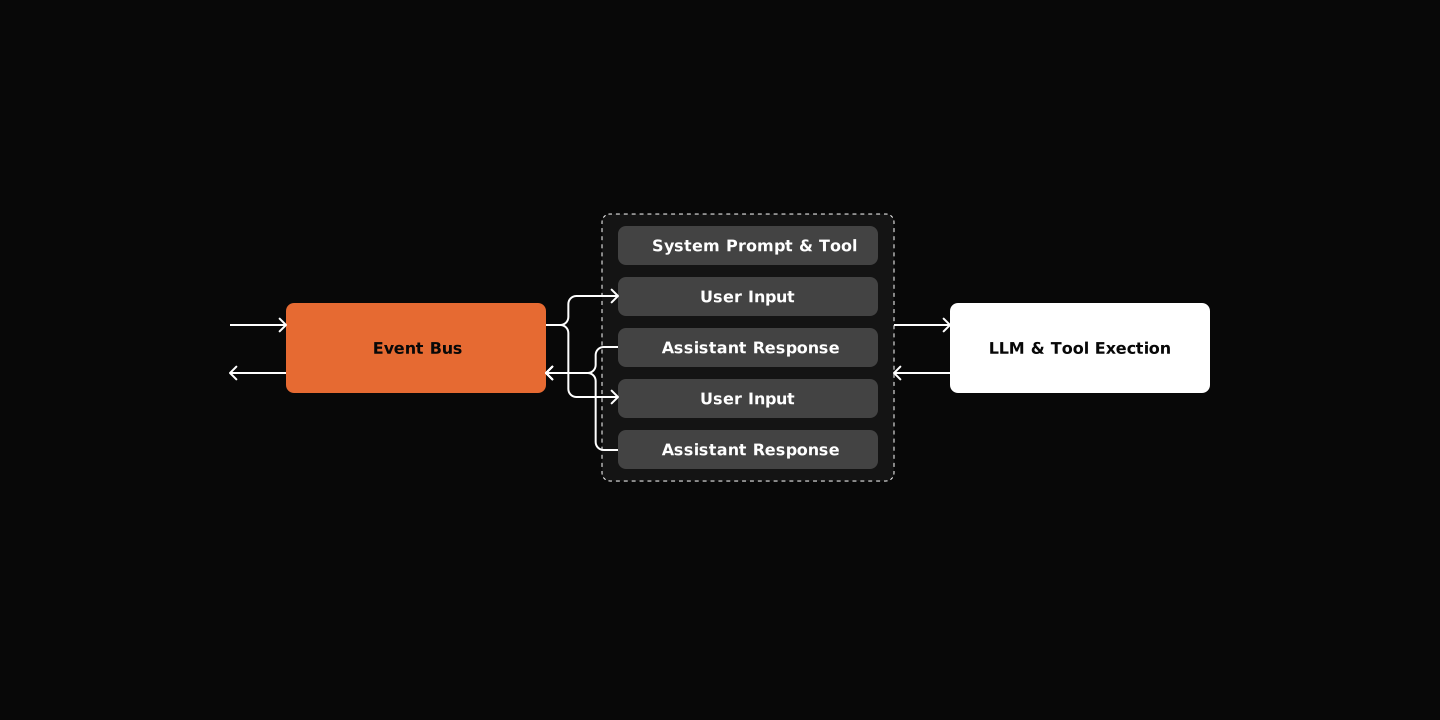
Channels, Agent Worker, and Delivery Worker
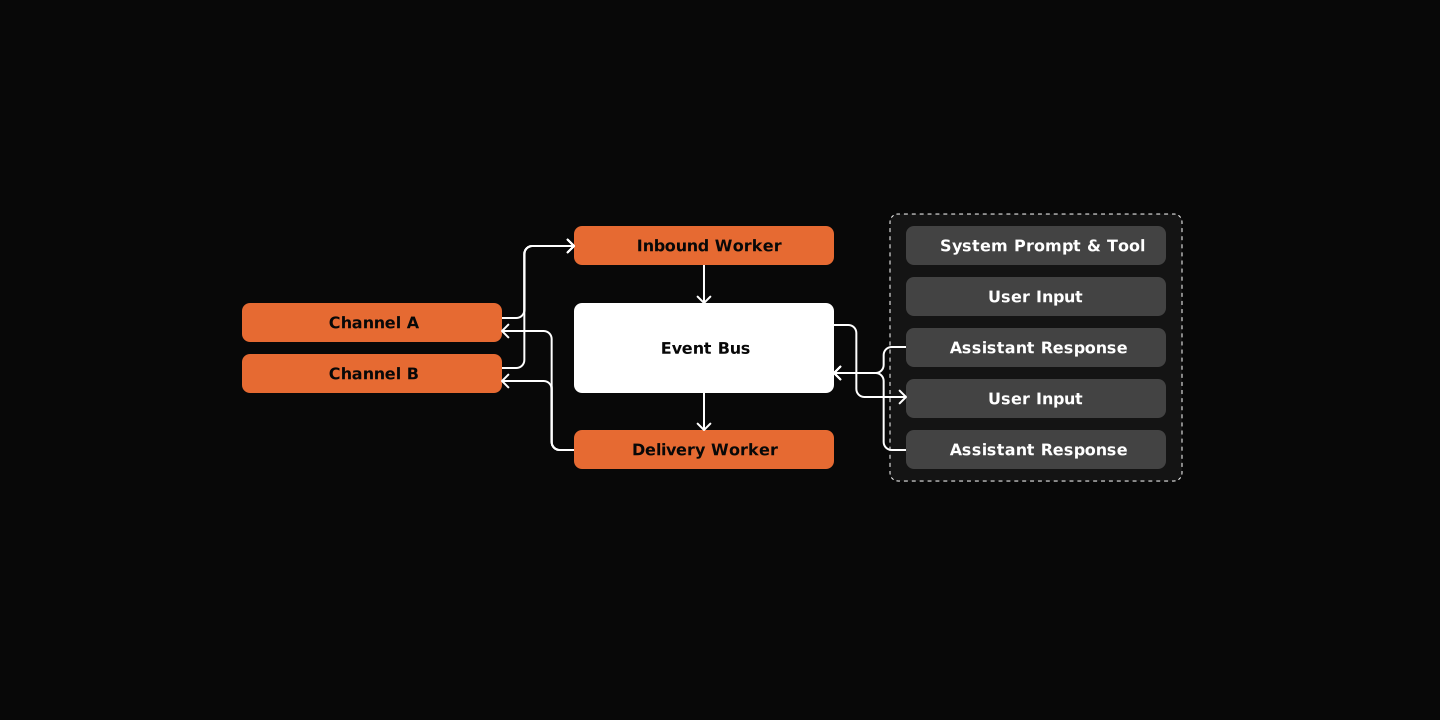
Three workers form a pipeline:
- Channel Worker — Receives messages from platforms (CLI, Telegram, WebSocket), publishes
InboundEvents - Agent Worker — Subscribes to
InboundEvents, runs the agent session, publishesOutboundEvents - Delivery Worker — Subscribes to
OutboundEvents, routes responses back to the right channel
A channel is an abstraction over a messaging platform. CLI, Telegram, Discord, WebSocket. The channel publishes an InboundEvent to the event bus.
class Channel(ABC):
    @abstractmethod
    async def run(self, on_message: Callable) -> None:
        """Run the channel. Blocks until stop() is called."""
        on_message(message) # Inbound Event to event_bus

    @abstractmethod
    async def reply(self, content: str, source) -> None:
        """Reply to incoming message."""
The agent worker bridges events and sessions:
class AgentWorker:
    def __init__(self, context):
        self.context.eventbus.subscribe(InboundEvent, self.dispatch_event)

    async def dispatch_event(self, event: InboundEvent):
        agent = Agent(agent_def, self.context)
        session = agent.resume_session(event.session_id)
        response = await session.chat(event.content)

        # Publish result
        result = OutboundEvent(
            session_id=event.session_id,
            content=response,
        )
        await self.context.eventbus.publish(result)
The delivery worker picks up OutboundEvents and sends them back through the appropriate channel:
class DeliveryWorker:
    def __init__(self, context):
        self.context.eventbus.subscribe(OutboundEvent, self.deliver)

    async def deliver(self, event: OutboundEvent):
        # Look up which channel this session belongs to
        channel = self._get_channel_for_session(event.session_id)
        await channel.reply(event.content, event.source)

        # Confirm delivery - removes persisted event file
        self.context.eventbus.ack(event)
Event Persistence: Don’t Lose Messages
What happens if the server crashes after the agent responds but before delivery? The message is lost.
The fix: persist OutboundEvents to disk before dispatching, delete only after successful delivery:
class EventBus(Worker):
    async def run(self) -> None:
        await self._recover()  # Re-dispatch pending events on startup
        while True:
            event = await self._queue.get()
            await self._dispatch(event)

    async def _dispatch(self, event: Event) -> None:
        await self._persist_outbound(event)  # Write to disk first
        await self._notify_subscribers(event)

    def ack(self, event: Event) -> None:
        """Called by DeliveryWorker after successful delivery."""
        filename = f"{event.timestamp}_{event.session_id}.json"
        (self.pending_dir / filename).unlink()  # Delete persisted file
The flow is complete:
`user message → channel → InboundEvent → AgentWorker → OutboundEvent → persist → DeliveryWorker → channel → user → ack → delete
WebSocket: Programmatic Access
Sometimes you want code to talk to your agent, not a human. WebSocket provides a programmatic interface.
The WebSocketWorker has two roles:
- Channel — Receives messages from WebSocket clients, publishes
InboundEvents - Broadcaster — Subscribes to all events, broadcasts them to every connected client
class WebSocketWorker:
    def __init__(self, context):
        self.clients: Set[WebSocket] = set()
        # Broadcaster role: subscribe to ALL events
        for event_class in [InboundEvent, OutboundEvent]:
            self.context.eventbus.subscribe(event_class, self.handle_event)

    # Channel role: receive from clients
    async def handle_connection(self, ws: WebSocket) -> None:
        self.clients.add(ws)
        try:
            await self._run_client_loop(ws)  # Publishes InboundEvent
        finally:
            self.clients.discard(ws)

    # Broadcaster role: send to all clients
    async def handle_event(self, event: Event) -> None:
        for client in list(self.clients):
            try:
                await client.send_json(event_dict)
            except Exception:
                self.clients.discard(client)

@app.websocket("/ws")
async def websocket_endpoint(websocket: WebSocket):
    await websocket.accept()
    await context.websocket_worker.handle_connection(websocket)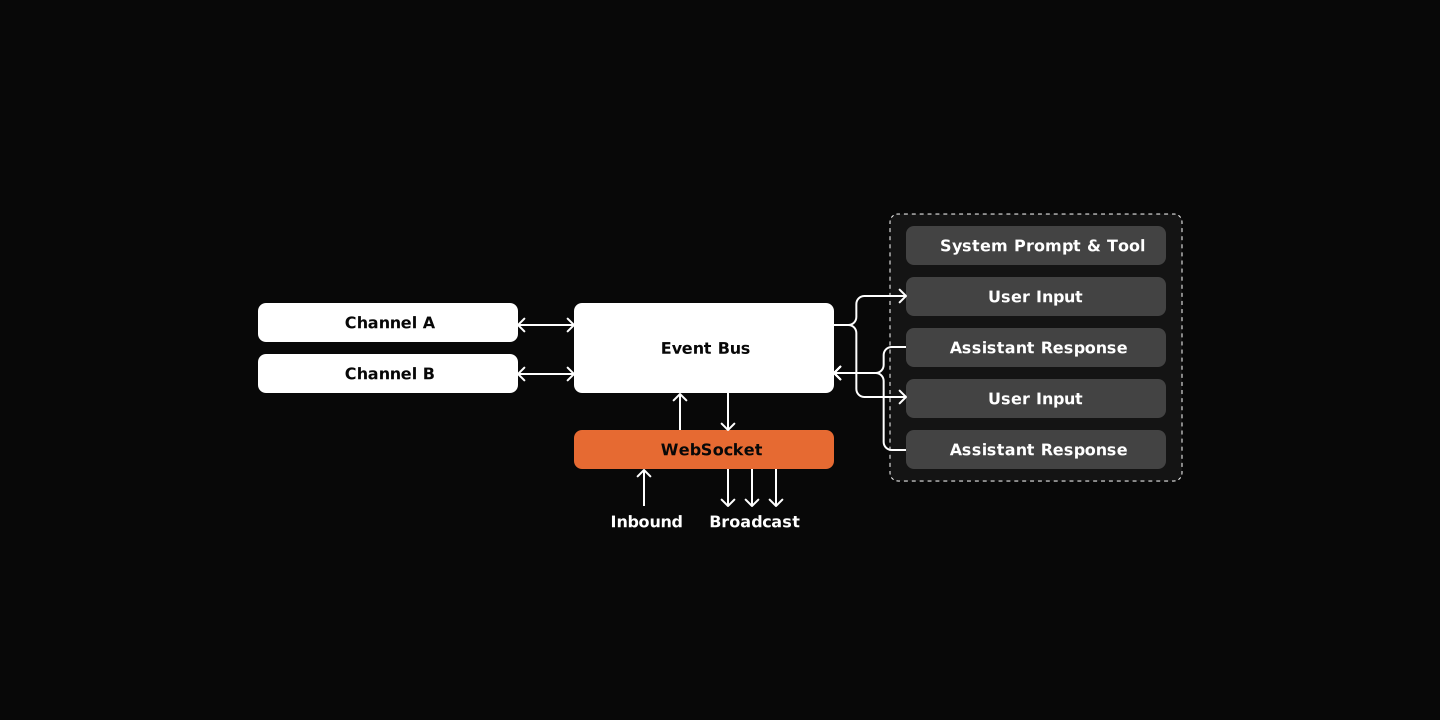
Many of Them: Multi-Agent Architecture
One agent can’t be an expert at everything. Neither should it try.
You’ve built a capable agent. It can read files, search the web, run commands. But ask it to do everything and it struggles. Some tasks need specialized knowledge. Some tasks need focused context. The solution isn’t a bigger agent—it’s multiple smaller ones.
Agent Discovery
Agents are defined in AGENT.md files. A loader discovers them at startup:
class AgentLoader:
    def discover_agents(self) -> list[AgentDef]:
        """Scan agents directory and return list of valid AgentDef."""
        return discover_definitions(
            self.config.agents_path, "AGENT.md", self._parse_agent_def
        )
Routing: Match Tasks to Agents
Right task to right agent? We need a routing policy to handle this.
- Tiered Routing Rules: Find rules matching inbound source, starting from most specific rules.
- Default Fallback: Fall back to global default agent if no rules match.
@dataclass
class Binding:
    agent: str
    value: str
    tier: int
    pattern: Pattern  # Compiled regex

    def _compute_tier(self) -> int:
        """Compute specificity tier."""
        if not any(c in self.value for c in r".*+?[]()|^$"):
            return 0  # Exact match
        if ".*" in self.value:
            return 2  # Wildcard
        return 1  # Specific regex

@dataclass
class RoutingTable:
    def resolve(self, source: str) -> str:
        for binding in self._load_bindings():
            if binding.pattern.match(source):
                return binding.agent
        return self.context.config.default_agent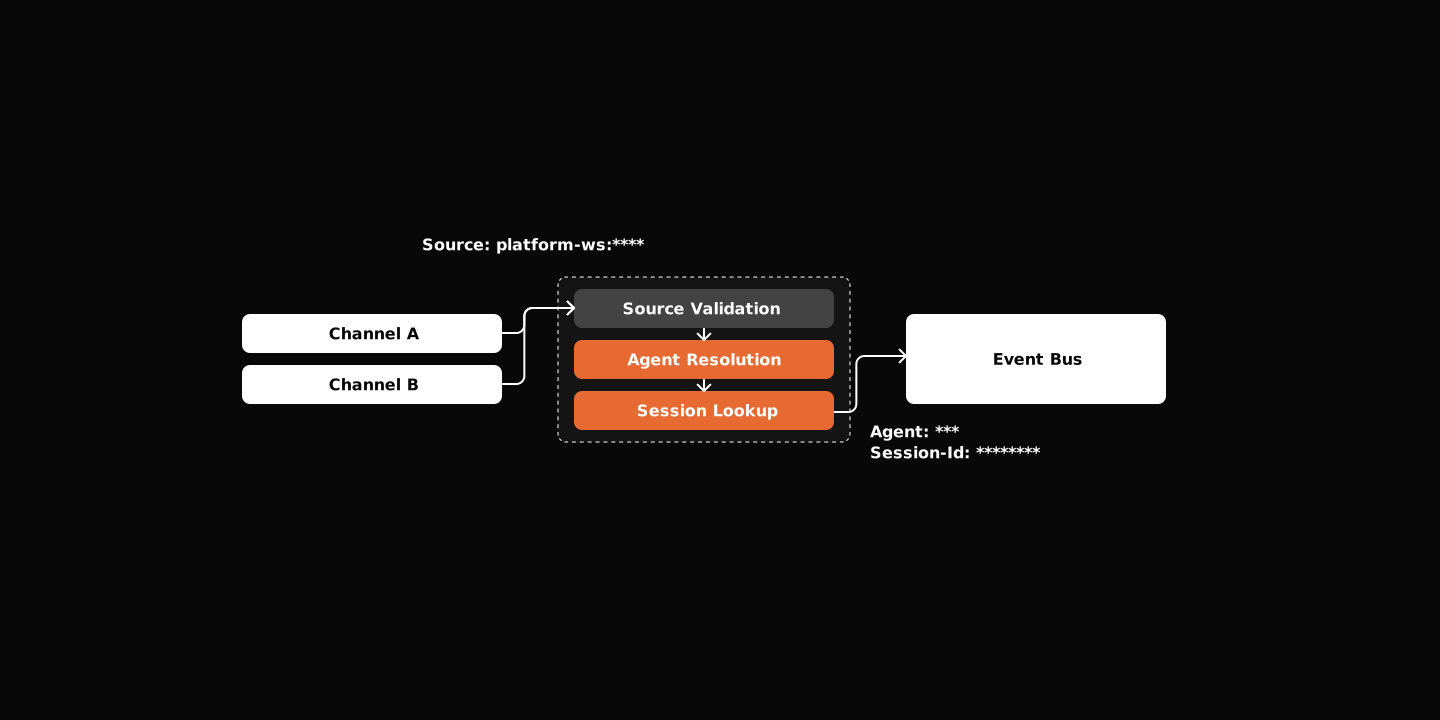
Integration in Channel Worker
When a message arrives, the channel worker uses the routing table to find the right agent:
async def callback(message: str, source: EventSource) -> None:
    # Use routing_table to resolve agent from bindings
    session_id = self.context.routing_table.get_or_create_session_id(source)

    # Publish event
    event = InboundEvent(session_id=session_id, source=source, content=message)
    await self.context.eventbus.publish(event)
Agents Want to Call Their Friends
Let’s have another tool to delegate tasks to other agents. The way it is implemented here:
- Load subagent definition
- Create session
- Publish dispatch event
- Wait for result
@tool(name="subagent_dispatch", description="Dispatch a task to a specialized subagent.")
async def subagent_dispatch(agent_id: str, task: str, session) -> str:
    agent_def = shared_context.agent_loader.load(agent_id)
    agent = Agent(agent_def, shared_context)
    agent_session = agent.new_session(agent_source)

    # Publish dispatch event
    await shared_context.eventbus.publish(DispatchEvent(...))

    # Wait for result
    response = await result_future
    return json.dumps({"result": response, "session_id": session_id})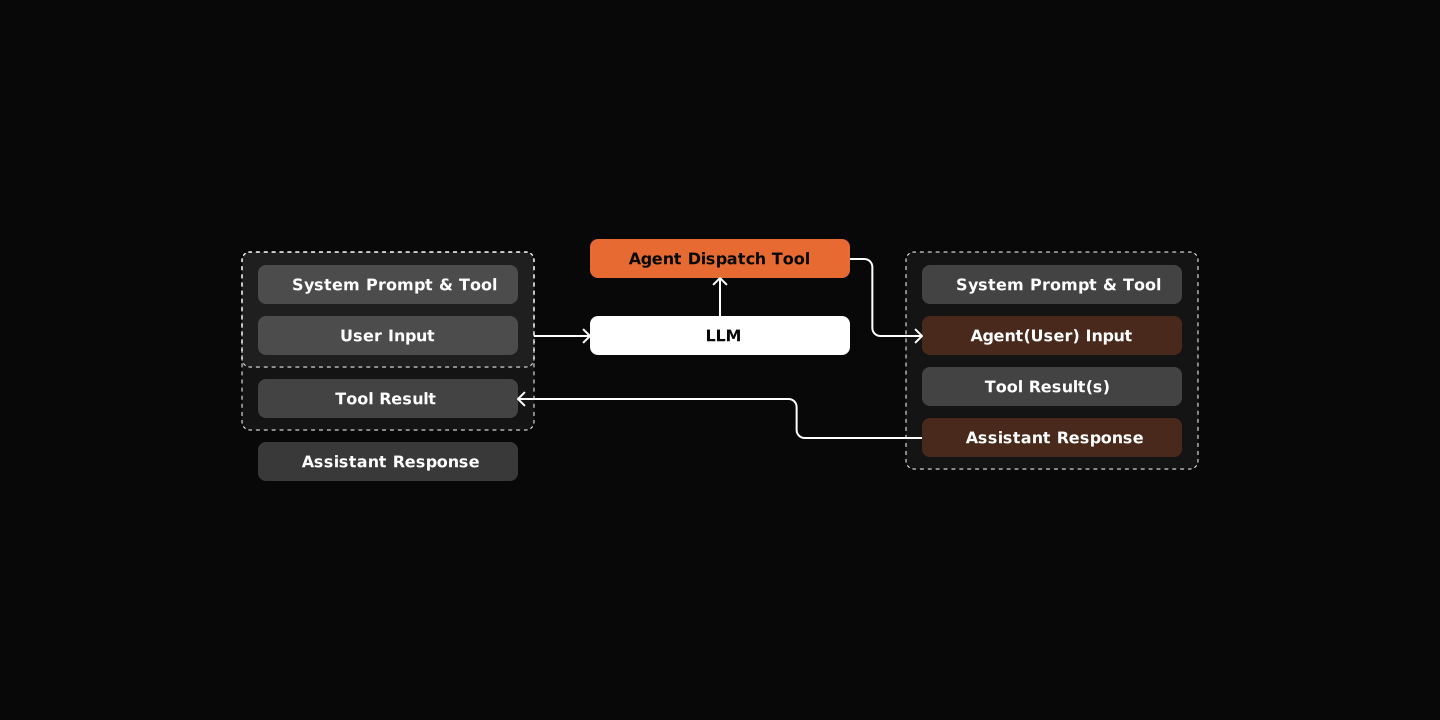
The main agent calls subagent_dispatch, which creates a new session for the subagent and waits for its response. The eventbus handles the communication.
Alternative Multi-Agent Patterns
Direct subagent dispatching is just one approach to multi-agent orchestration. Here are some other common patterns:
- Shared Task Lists: Agents coordinate by reading from and writing to a shared task queue or database. Each agent picks up tasks as they become available—agents never talk to each other directly.
- Tmux/Screen Sessions:
tmuxallows us running multiple processes. Atmuxskill can be provided to agent to guide it to execute multiple tasks, achieving multi-agent to some extent.
Cron & Heartbeat: Agents That Work While You Sleep
Your agent works when you talk to it. But what if it could work while you sleep?
Nothing different from a cron job in the engineer world—cron expressions define when a job runs. A background worker checks every minute, finds due jobs, and dispatches them.
Jobs are defined in CRON.md files with a schedule and prompt. The agent runs at the appointed time, does the work, and optionally posts a message back.
class CronDef(BaseModel):
    id: str
    name: str
    description: str
    agent: str
    schedule: str  # Cron expression
    prompt: str
    one_off: bool = False

class CronWorker(Worker):
    async def run(self) -> None:
        while True:
            await self._tick()
            await asyncio.sleep(60)

    async def _tick(self) -> None:
        jobs = self.context.cron_loader.discover_crons()
        due_jobs = find_due_jobs(jobs)

        for cron_def in due_jobs:
            event = DispatchEvent(
                session_id=session.session_id,
                source=CronEventSource(cron_id=cron_def.id),
                content=cron_def.prompt,
            )
            await self.context.eventbus.publish(event)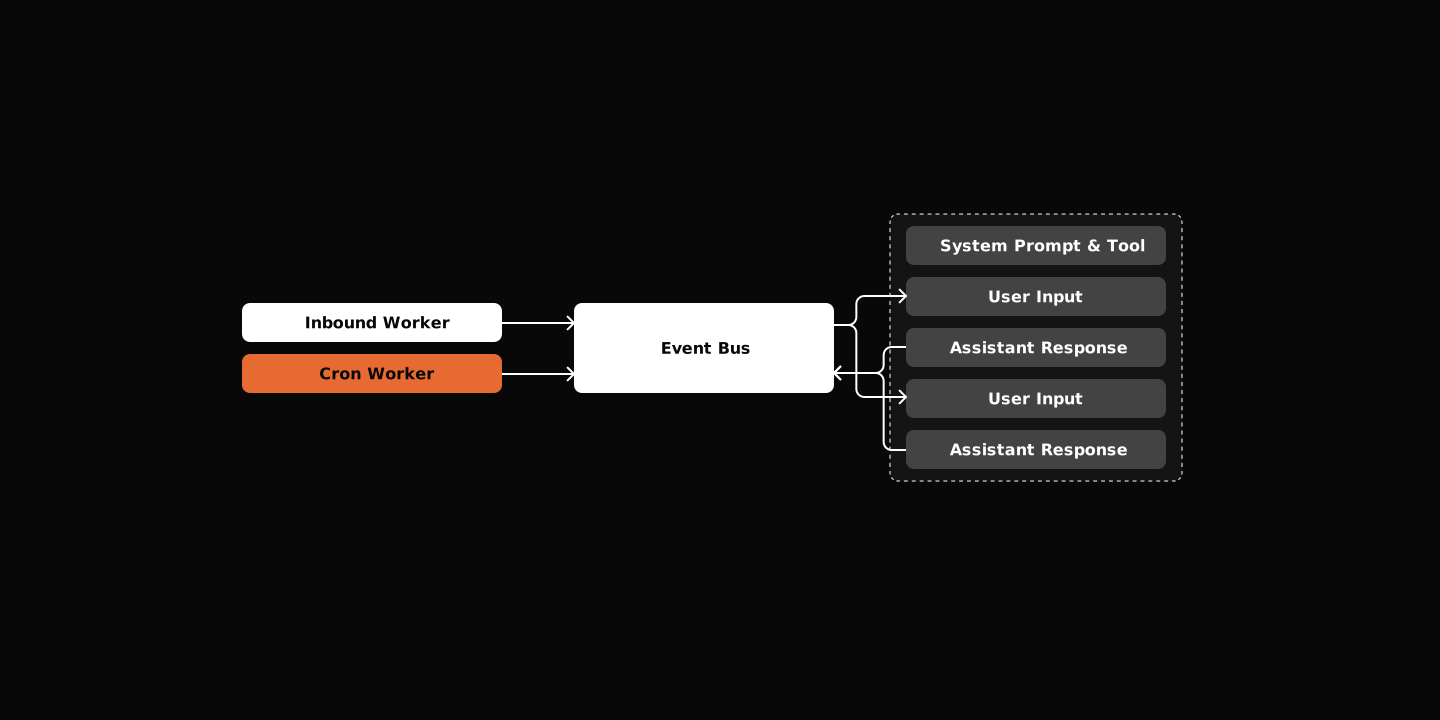
Cron-Ops Skills
The Cron Operation functionality is implemented using the SKILL system rather than registering dedicated tools, which avoids bloating the tool registry.
Reference example repo for example skills.
Concurrency Control: Don’t Overload
When multiple requests come in—from cron jobs, from users, from other agents—you need limits. Some agents are expensive to run. Some APIs have rate limits. Unbounded concurrency leads to failures.
Let’s use a semaphore-based solution to limit concurrency. Each agent has a max_concurrency setting. The semaphore ensures no more than that many instances run at once. Requests wait in line instead of crashing the system.
class AgentWorker(SubscriberWorker):
    def __init__(self, context):
        self._semaphores: dict[str, asyncio.Semaphore] = {}

    async def exec_session(self, event, agent_def) -> None:
        sem = self._get_or_create_semaphore(agent_def)
        async with sem:  # Blocks if limit reached
            # ... execute session ...
Post Message Back: Agents Can Initiate
Sometimes an agent needs to reach out proactively. Maybe it finished a long-running task. Maybe it detected something important. The post_message tool lets agents initiate conversations.
@tool(...)
async def post_message(content: str, session) -> str:
    event = OutboundEvent(
        session_id=session.session_id,
        source=AgentEventSource(agent_id=session.agent.agent_def.id),
        content=content,
    )
    await context.eventbus.publish(event)
    return "Message queued for delivery"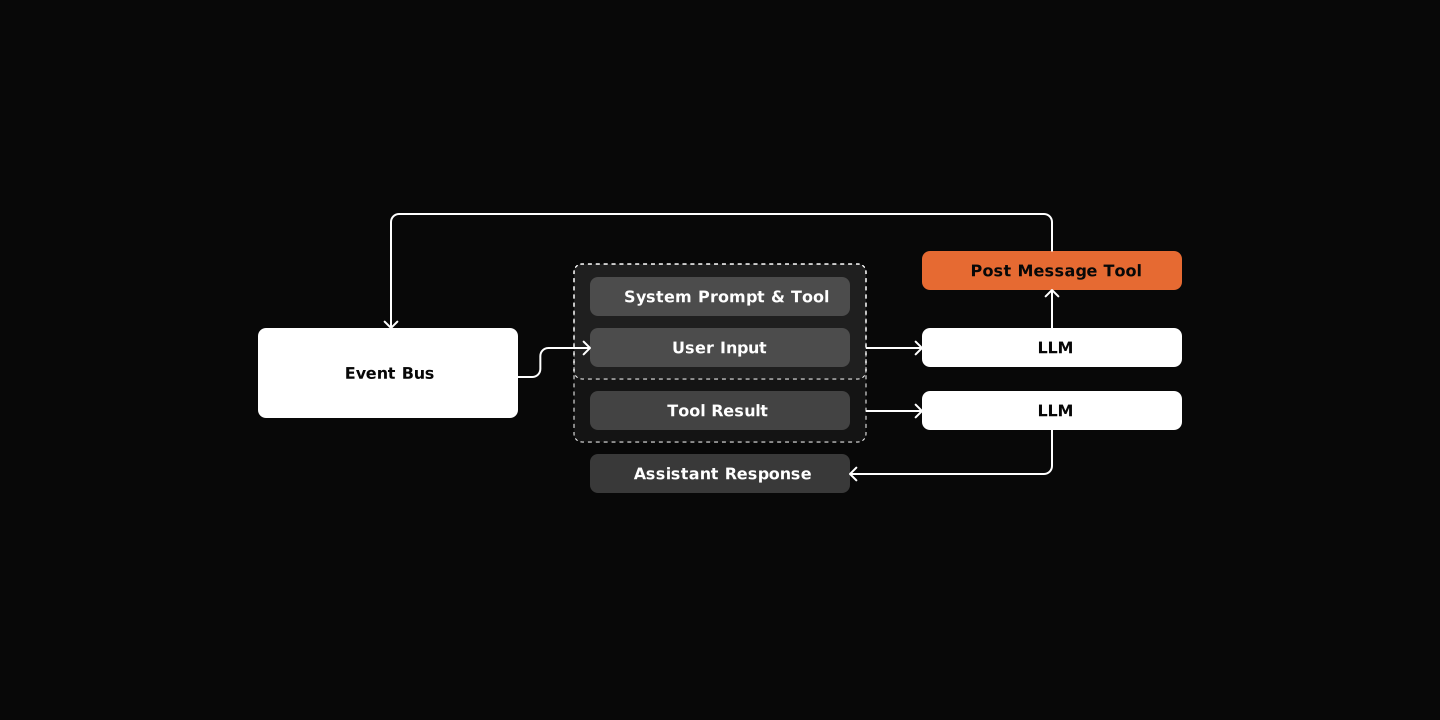
This is how agents say “I’m done” or “Something happened” without being prompted.
The post_message tool is only available in Cron jobs—agents can’t arbitrarily post messages outside scheduled tasks.
HEARTBEAT Vs CRON
OpenClaw has two distinct scheduling mechanisms:
- HEARTBEAT: Only one allowed, runs in the main session at a regular interval without checking time. Simple periodic execution.
- CRON: Multiple allowed, runs in background respecting cron expressions. Full scheduling flexibility.
Multi-Layer Prompts: Context Stacking
Getting the system prompt right is actually a non-trivial job. And a lot of pieces are not static.
They’re assembled from multiple layers, each adding context from different aspects:
- Identity — Rarely changes (agent’s core purpose)
- Personality — Optional flavor, mostly static
- Bootstrap — Workspace guide, changes when you switch projects
- Runtime — Timestamp, session ID—every request
- Channel — Where the message came from—varies per request
class PromptBuilder:
    def build(self, state: "SessionState") -> str:
        layers = []

        # Layer 1: Identity
        layers.append(state.agent.agent_def.agent_md)

        # Layer 2: Soul (optional)
        if state.agent.agent_def.soul_md:
            layers.append(f"## Personality\n\n{state.agent.agent_def.soul_md}")

        # Layer 3: Bootstrap context (workspace guide)
        bootstrap = self._load_bootstrap_context()
        if bootstrap:
            layers.append(bootstrap)

        # Layer 4: Runtime context
        layers.append(self._build_runtime_context(agent_id, timestamp))

        # Layer 5: Channel hint
        layers.append(self._build_channel_hint(source))

        return "\n\n".join(layers)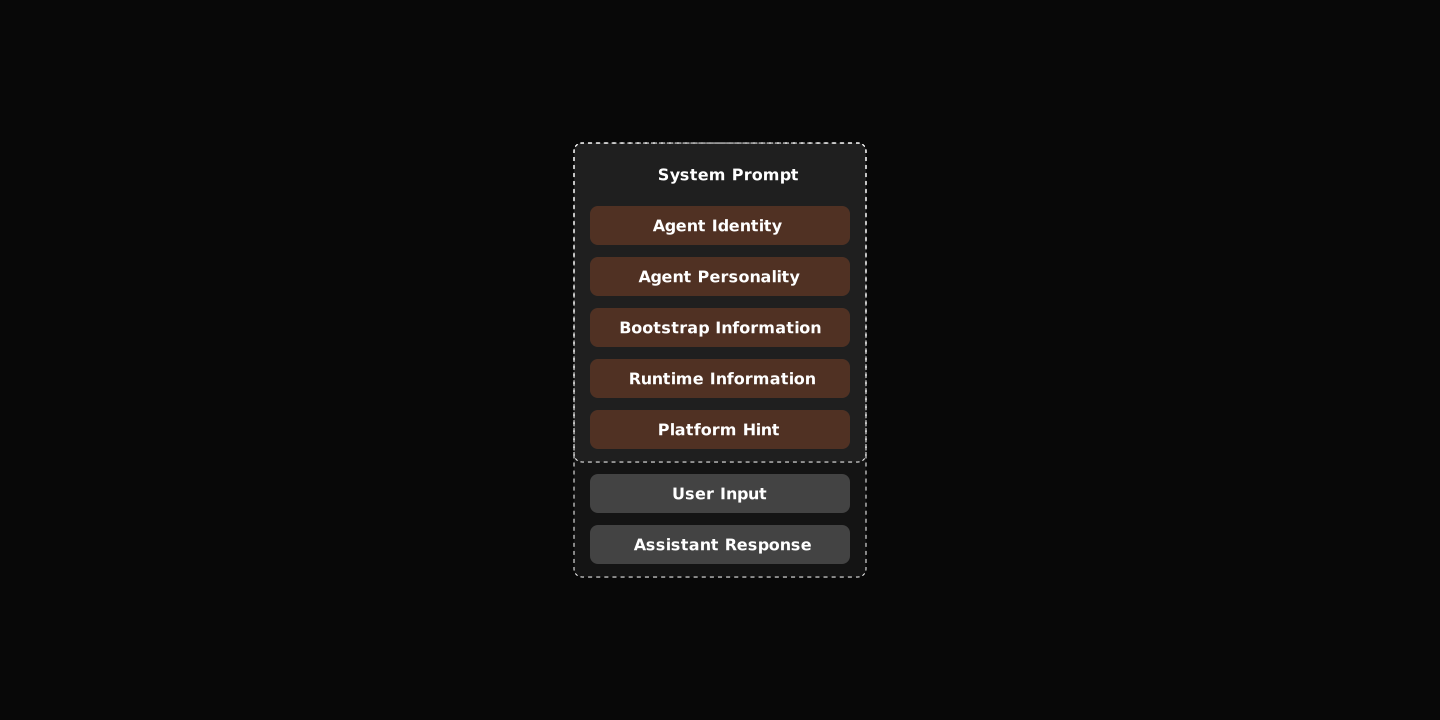
Memory: Long-Term Knowledge
Session context is ephemeral. Memory persists. The pattern shown here uses a specialized agent:
pickle: @cookie Do you know <topic> about user?
cookie: Yes, <content>.
A memory agent manages storage and retrieval. The main agent dispatches queries when it needs to remember something.
Memory can be structured as something like below, but this is super flexible:
memories/
├── topics/
│   ├── preferences.md    # User preferences
│   └── identity.md       # User info
├── projects/
│   └── my-project.md     # Project-specific notes
└── daily-notes/
    └── 2024-01-15.md     # Daily journal
Memory System Alternatives
The specialized agent approach keeps the main agent focused. But there are other approaches:
- Direct tools - Memory tools in the main agent
- Skill-based - Use CLI tools like grep
- Vector database - Semantic search over embeddings
Each has trade-offs. File-based is simple but limited. Vector databases scale but add complexity. Choose based on your needs.
The Open-Ended Problem
Memory is where agents get hard. Retrieval relevance, storage efficiency, context integration—these are unsolved problems at scale. This implementation is a starting point. Where you take it depends on your use case.
Memory is where agents become personalized. And where the hard problems live.
You’ve now built a complete agent system—from a simple chat loop to production-ready infrastructure with multi-agent orchestration, scheduling, and memory.
⭐ Star the repo if you found this series helpful!
Read Part 1: Build a Capable AI Agent if you haven’t built your agent yet.
On this page
Beyond the CLI
Event-Driven Architecture
Channels, Agent Worker, and Delivery Worker
Event Persistence: Don’t Lose Messages
WebSocket: Programmatic Access
Many of Them: Multi-Agent Architecture
Agent Discovery
Routing: Match Tasks to Agents
Integration in Channel Worker
Agents Want to Call Their Friends
Alternative Multi-Agent Patterns
Cron & Heartbeat: Agents That Work While You Sleep
Cron-Ops Skills
Concurrency Control: Don’t Overload
Post Message Back: Agents Can Initiate
HEARTBEAT Vs CRON
Multi-Layer Prompts: Context Stacking
Memory: Long-Term Knowledge
Memory System Alternatives
The Open-Ended Problem
Related
How Hermes-Agent Evolves Over Time
by a Developer
May 2026
by a Developer
agent
ai
Hermes-Agent claims to be "the agent that grows with you". It's not marketing — it's three counters, a background fork, and a 100-line prompt.
Learn From Claude Code: Agent Spawning
by a Developer
Apr 2026
by a Developer
agent
ai
Learning Claude Code's agent spawning by inspecting its leaked source code.
Learn From Claude Code: App State Machine
by a Developer
Apr 2026
by a Developer
agent
ai
Learning Claude Code's App State by inspecting its leaked source code.
Learn From Claude Code: MCP Integration
by a Developer
Apr 2026
by a Developer
agent
ai
Anthropic invented MCP a year ago. Now they're experimenting with skill-ifying it. Here's what the leaked source reveals about the pivot.